Overview
Your Timeline subscription is managed through the Account Center. All subscriptions include four account roles with distinct permissions.
A) Key Permissions
B) Billing Owner
C) Reseller
D) Workspace Admin
E) End User
F) Permissions at a Glance
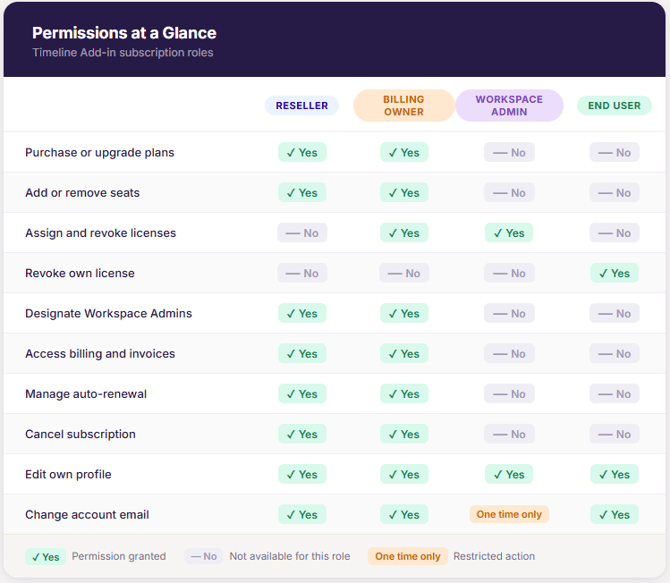
This guide defines each role and details its permissions and limitations. You can read it from start to finish to get familiar with the role system, or jump straight to the section that interests you most using the links above. For a side‑by‑side view of role permissions, refer to the summary table at the end of this article.
A) Key Permissions
- Billing Owners can purchase and upgrade plans, add or remove seats, designate and reassign Workspace Admins, manage auto-renewal, and access billing and invoice records in the Account Center
- Resellers Resellers complete the purchase on behalf of a customer and become the Billing Owner for that subscription.
- Workspace Admins receive assignment instructions and can assign or revoke End User licenses; they cannot purchase, upgrade, or access billing
- End Users maintain access to Timeline after license expiration, but the add-in downgrades to the free version with premium features disabled
B) Billing Owner
The Billing Owner is the person or organization that purchased the Lucen Timeline subscription. In reseller scenarios, the reseller holds this role.
-
The Billing Owner has full control over the Account Center, including purchasing new plans, upgrading, managing users, and accessing billing and invoices.
-
The Billing Owner can designate Workspace Admins and reassign that role to another team member at any time.
-
There is only one Billing Owner per subscription.
Other default roles: By default, the owner will be automatically assigned as the Workspace Admin of an Timeline subscription if:
- They don’t expressly designate someone to manage licenses at checkout (when purchasing themselves, directly from Timeline.com).
C) Reseller
The Reseller is the individual merchant or company that purchases an Timeline subscription on behalf of a customer, rather than for their own use.
-
When a Reseller purchases a subscription, they become the Billing Owner with full control over the Account Center.
-
Resellers do not receive ownership or management rights and cannot assign licenses or manage users.
Auto-renewal is off by default for subscriptions imported through a reseller.
D) Workspace Admin
The Workspace Admin is responsible for administering licenses and managing users within the subscription.
-
Workspace Admins can assign and revoke licenses, add and remove End Users, and edit their own admin profile settings.
-
They can revoke their own admin rights, but only the Billing Owner can assign new Workspace Admins.
A Workspace Admin can only change their account email address one time. This restriction is in place to prevent fraud. If a Workspace Admin needs to update their email after that one-time change, contact support.
E) End User
An End User is any person who has been assigned an Timeline license and activated it on their machine.
-
End Users access premium features for as long as their license is active.
-
After a license expires, the add-in reverts to the free version with premium features disabled.
Note: When a license expires, users continue to have access to Timeline; however, the add-in will switch to the Free version, and premium features will be disabled.
F) Permissions at a Glance